
The DBENTRY API
The DBENTRY emulator is a set of libraries and utilities designed to replace an MVS CA-DATACOM database (formerly DATACOM-DB) with DB2 for z/OS, distributed DB2 or PostgreSQL, transparently and with minimal disruption.
This solution illustrates HH&S expertise in Mainframe database migration and integration with DB2 and PostgreSQL.
It is designed to:
- retain COBOL programs containing DATACOM-DB commands without modifying them: relinking with the DBENTRY API transparently redirects DBENTRY calls to DB2 on z/OS or UNIX, or to PostgreSQL on UNIX;
- port MVS DATACOM-DB COBOL programs to UNIX unchanged or with minimal modifications.

This solution provides an alternative to rewriting existing application COBOL code.
It helps reduce the cost and duration of a DATACOM-DB migration:
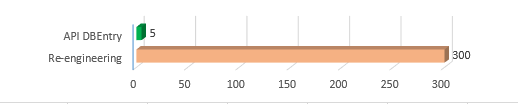
The DBENTRY API library is installed on z/OS (MVS).
Supported database platforms are:
- z/OS with DB2
- AIX with DB2 or PostgreSQL
- Linux x86 with DB2 or PostgreSQL
- Linux on Z with DB2 or PostgreSQL
The library
The DBENTRY emulator consists primarily of a shared library with a main entry point named DBENTRY for COBOL calls. It accepts exactly the same parameters as the MVS DATACOM subsystem.
When linked with a COBOL program, the library's DBENTRY entry point interprets the parameters of each CALL DBENTRY command and dynamically converts DATACOM requests into SQL statements.
It dynamically generates SELECT, UPDATE, INSERT and DELETE statements with the corresponding WHERE and ORDER BY clauses. It also analyses or reconstructs exactly the COBOL record supplied with the DATACOM parameters.
The tools
The utilities add descriptions of the DATACOM records read and written by COBOL programs in MVS DATACOM tables, and help build the corresponding PostgreSQL or DB2 tables and indexes.
On UNIX, the unchanged COBOL program is treated as an external module. A small C main() routine establishes the database connection and then calls the COBOL module.
The following DATACOM DBENTRY commands are supported:
| ABEND | Abnormal Termination Command |  |
| ADDIT | Add Record | |
| CLOSE | Close User Requirements Table | |
| CNTKR | Count For Key Value Range | |
| CNTKY | Count For Equal Key Value | |
| CNTTN | Count For Table | |
| COMIT | Commit Transaction | |
| DELET | Delete Record | |
| GETIT | Retrieve Next Sequential Record | Must review code before confirm |
| GETPS | Get Next Physical Sequential Record | n/a |
| GSETL | Set To Starting Key | n/a |
| GSETP | Set Physcal Sequential Record | n/a |
| INQIN | Inquire CA | n/a |
| LOCBR | Locate Backwards | Must review code before confirm |
| LOCKG | Locate Key Greater or Equal | |
| LOCKI | Test For Logical Intersections of Two Keys | |
| LOCKL | Locate Key Less or Equal | |
| LOCKR | Locate a Record in a Specified Range | |
| LOCKX | Locate Key Exact | |
| LOCKY | Locate Key Greater or Equal | |
| LOCNE | Locate Next Equal Key Value | Must review code before confirm |
| LOCNK | Locate Next Key | Must review code before confirm |
| LOCNR | Locate Next Record in Specified Range | Must review code before confirm |
| LOCNX | Locate Next | Must review code before confirm |
| LOGCP | Checkpoint the Task | n/a |
| LOGCR | Log Checkpoint With Release | n/a |
| LOGDR | Log Directed Read | n/a |
| LOGDW | Log Directed Write | n/a |
| LOGIT | Add Data to Log Area" | n/a |
| LOGLB | Read Back a LOGIT Record | n/a |
| LOGTB | Back Out Transactions | n/a |
| NOOPS | No Operation | |
| OPEN | Open User Requirements Table | |
| RDUKG | Read Key Greater or Equal for Update | |
| RDUKL | Read Key Less or Equal for Update | |
| RDUKX | Read Key Exact for Update | |
| RDUKY | Read Key Exact for Update | |
| RDULE | Read Located Entry for Update | |
| RDUNE | Read Next Equal Key for Update | |
| RDUNX | Read Next for Update | |
| REDBR/RDUBR | Read Backwards | Must review code before confirm |
| REDID/RDUID | Read Records By Id | n/a |
| REDKG | Read Key Greater or Equal | |
| REDKL | Read Key Less or Equal | |
| REDKR/RDUKR | Read Record in a Specified Range | |
| REDKX | Read Key Exact | |
| REDKY | Read Key Exact | |
| REDLE | Read Located Entry | |
| REDNE | Read Next Equal Key | |
| REDNK/RDUNK | Read Record w/ Next Sequential Key | Must review code before confirm |
| REDNR/RDUNR | Read Next Record in a Specified Range | |
| REDNX | Read Next | |
| RELES | Release Record (if no update) | |
| RELFL | Release Table | |
| ROLBK | Rollback Transaction | |
| SELCN | Continue Set Record Selection | |
| SELFR | Select Set and Return First Record | |
| SELNR | Select Next Record" | |
| SELPR | Release Set | |
| SELSM | Select Same Record | |
| SELST | Stop Set Record Selection | |
| TEST | Test Option Command | n/a |
| UPDAT | Update Record | |
For more information, contact us.