HH&S product

XSM eXtended Sort Merge

Fast sort/merge software for large files.

Your challenges:

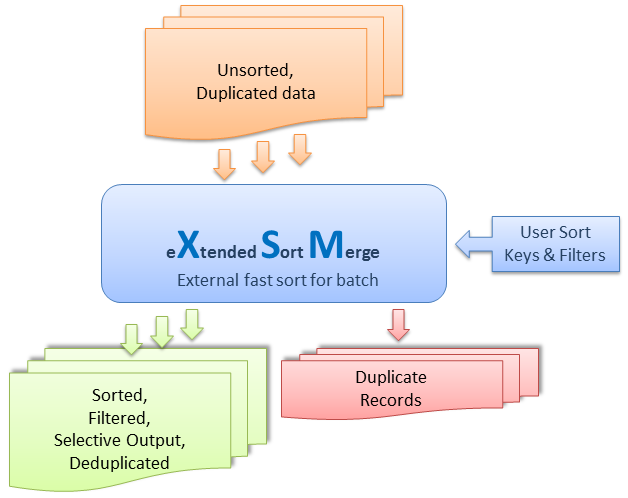
  • Sort, merge, split, filter and deduplicate large data files exceeding 100 GB on affordable machines
  • Process large volumes of new data quickly every day
  • Increase your processing capacity by reducing processing time from 20 hours to 4 hours
  • Speed up your Data Warehouse ETL/EDI data exchanges
  • Optimize software costs by moving away from much more expensive competing software

The solution:

  • XSM, already adopted by more than 60 clients in 12 countries
  • XSM delivers outstanding performance through its proprietary multithreading technology, making the most of current multiprocessor architectures on high-end IBM, SUN and HP systems as well as affordable multi-core PCs.
  • XSM provides powerful features for the standard sort, merge, split and filter operations required by Data Warehousing and Data Mining processes.
    With the evolution of information technology in storage capacity and CPU power, data volumes have grown rapidly. CPU power alone is not enough: software performance is essential.

Why use an external sort?

1. External sorting to speed up database loading

Suppose you have to load large data files every night into your preferred database: Oracle, DB2, MySQL, SQL Server, Informix or Sybase.

In this example, we use MySQL, which is reasonably fast at loading data.

Suppose you have a heavily indexed table whose contents must be deleted and reloaded from files every night:

  • if your external data is not sorted, your database server must do the work;
  • if your external data is presorted, the database server only has to load it, without the overhead of building its indexes.

Consider the following benchmark:

  • Input: 100 MB ASCII text file containing 1,023,009 records
  • Variable-length, tab-separated records with five columns: two integers and three strings
  • MySQL Server 4.0.10-gamma on Linux 2.4.18, Pentium II 550 MHz, 512 MB RAM (the same principle applies to any RDBMS)
  • The chart shows total elapsed loading time in seconds:
Loading comparison: unsorted data 10200, pre-sorted data 528

Database loading with unsorted data:

  • Data loading: 10,200 seconds
  • Total: 10,200 seconds = 2 hours 50 minutes 28 seconds.

Database loading with presorted data:

  • Presort: 315 seconds (using XSM V5.08)
  • Data loading: 213 seconds
  • Total: 528 seconds = 8 minutes 48 seconds, roughly 20 times faster!

This demonstrates the purpose of external sorting: presorting speeds up large data processing.

Do not leave this task to an integrated database engine that “can do everything”: it is not its job.

2. Merge / Split / Filter / Selective copy / Identify and remove duplicate records

You need to merge, split, filter or copy data according to defined criteria.

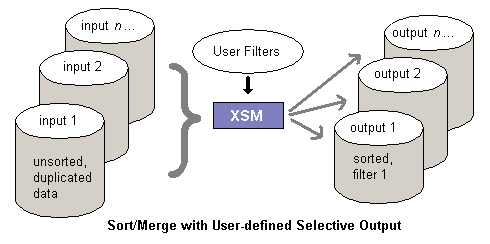
Consider a simple example: every day, you receive a sales report composed of 50 files and need to split the data by ZIP code, creating one distinct file per ZIP code.

Two solutions:

  1. Use your RDBMS: many developers would choose this option, but it is not the right one.
    • Drop / create table: 30 seconds
    • Load 50 files into the table: 1 hour
    • Run a deduplication SQL job: 1 hour
    • Run 100 unload jobs, one per ZIP code: 2 hours

    Estimated total time: 4 hours

  2. Use XSM as a batch external sort/merge utility.
    • In a single operation, XSM merges, sorts, deduplicates and selectively splits the data
    Selective split

    Estimated total time: 5 minutes

Demo

See how to sort, merge, deduplicate and selectively split CSV text files.

Demo